Recovery
This Daily Sprint is about restoring a database after a crash, considering the transactions which are happened since the last full backup. Actions within this step are making a full backup of a database, set the database offline and online as well as load a database from a backup and spool in the log data file.
After doing this task, you should be able to successfully restore a database and know, what a mdf and a ldf file is good for. Further, extended knowledge about what happened internal when the database crashed and how which data is stored and can be restored should be aquired.
Good luck with the following tasks!

Before a database can be restored, we need a backup first. A database consists of two types of files which have to be backuped, the mdf and the ldf files.
The mdf is the primary database file, which contains the schema and data of the database. We need to backup this file in order to get a full backup with all data.
The ldf is the database log file, which contains the logs of transactions on a database. We need this file to get all lost data since the last full backup, when we attempt to restore the database.
While the restore process, we first restore the mdf file, and get the database in the state of when the backup was done. Then we need to restore the data which have been altered and added to the database since then. Therefore, the log files have to be spooled back into the database to get the data since the last backup.
First of all, we need to set up a database to work with, for our example the following create statements are sufficient.
Create Statements:
Use[DatabaseExample] |
|
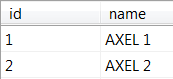
After the creation of the database was successfull, it should be checked through a select. Then we can continue with our first step, we begin a transaction called ‘t1’ and update the name of the first datarow from ‘Axel 1’ to ‘Max 1’. This do we need later, to check if the database recovery was executed correctly. Further information about Transaction can be found here
USE[DatabaseExample] BEGIN TRANSACTION t1 UPDATE dbo.Test SET Name='Max 1' SELECT * |
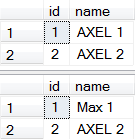 |
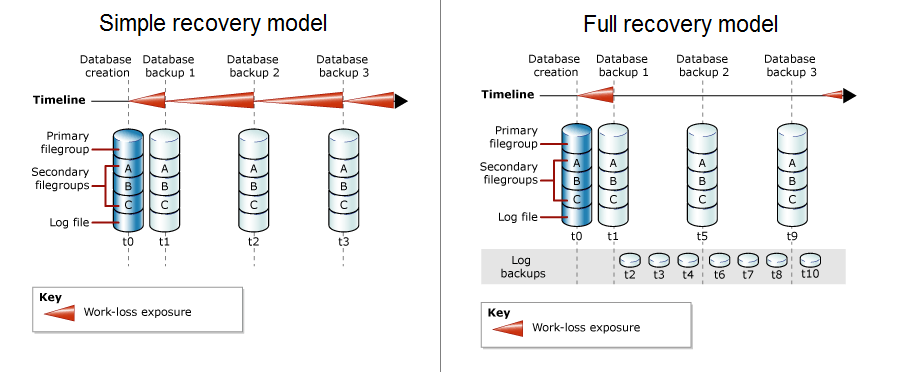
The next step is to set the mode for recovery. The options are ‘Simple’, ‘Full’ and ‘Bulk logged’.
The mode ‘Simple’ do not provide backup of protocols, which means that the ldf files are not backuped. This method is good, because it use less space on the hard disc than the others. Although, it can be come to data loss, if there were alterations between the last backup and a crash.
The mode ‘Full’ needs more space because the protocols are within the backup, which needs more time and disc space, but the alterations since the last backup and a crash can be recovered if the ldf files are not damaged.
‘Bulk logged’ is normally used within mass data storage systems. It provides higher performance and need less memory for certain operations. Nevertheless, it is not possible to restore the whole database, but only the state of the last backup.
For this example, the mode ‘Full’ is used, because we want to restore not only the data of the last backup, but also the alterations since then. Informations about recovery models can be found here
ALTER DATABASE [DatabaseExample] |
 |
Now we do a backup for our database. With the command ‘TO DISK’, the target space and name for the backup can be specified. ‘WITH FORMAT’ is important when we want to create a new backup and or want to overwrite any existing backups. Information about backup
BACKUP DATABASE [DatabaseExample] |
A second transaction is needed after the backup is done, in order to check later, if the alterations after the backup are restored correctly.
USE[DatabaseExample] BEGIN TRANSACTION t2 UPDATE dbo.Test SET Name='Max 2' SELECT * COMMIT TRANSACTION t2 |
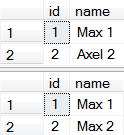 |
The next step is a little bit complicated, because no clear defined instruction can be given to the student. The problem is that the database have to be shut downed, which is easy to do, but the student need direct access on the mdf files, which is tricky when the student do not run the system on his own. Then, instructions and help from a teacher is needed to perform this actions.
ALTER DATABASE [DatabaseExample] --Delete MDF File ALTER DATABASE [DatabaseExample] |
In order to restore the alterations since the last backup, a backup of the logfiles, which are hopefully undamaged have to be done. Within a real database, the logfiles have to be stored on another hard disk as the mdf files, to ensure that they are undamaged if the primary hard drive with the mdf file has crashed.
The command ‘TO DISK’ define, like it did before at the mdf file backup the destination and the name of the backup. ‘INIT’ defines that backups with the same name have to be overwritten, what is not really needed in our example, but because log files are backuped frequently, it is good practice to use this command.
The last one is ‘NO_TRUNCATE’ which is very important for the example, because it defines that the backup is done although the database is damaged. Further information about log backups
BACKUP LOG [DatabaseExample] |
Finally, we attempt to restore the the database out of our backup. Like we have done before when we saved the backup, we now need to tell the script the destination and name of the backup.
What is very important here is, that the command ‘NORECOVERY’ is there, so that the database do not exit the recovery-mode. The recovery-mode make the database unusable by any IO operations but we need it, because we want to spool back the ldf backup into the database. If the database is set online, this would not be possible.
When we spooled back the ldf files, the ‘NORECOVERY’ command is not used and the database goes finally online again.
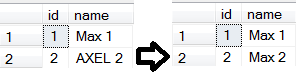
After this last step, the final test if all data is restored correctly is done.
RESTORE DATABASE [DatabaseExample] RESTORE LOG [4A_19_scho_isolationlevel] SELECT * |
 |
This instructions cover the steps done with scripts which is always working and most times easier. Microsoft SQL Server although also offers the possibility to do this steps with the Management Studio with mouseclicks. This is throughoutly described in the following video!
Exercises
In order to strenghen the new aquired knowledge, the following exercises are given:
– Alter the given example and do not use the command ‘NORECOVERY’ when the mdf file backup is spooled back. What is the influence and is the database complete?
– Do the ldf file backup before destroying the mdf file. Are there any changes?
– Change the recovery model from full backup to simple and follow the steps of the exercise. Is there an influence on the outcome?
– Try to select all rows between the import of the mdf file backup (with ‘NORECOVERY’) and the ldf file backup. Can the database be accessed?
– Extend the example with a third transaction and a third data row. The third transaction alter the third row just to see if the alteration take effect. After the second transaction and after the third transaction, a backup of the log file (2 seperate backups) have to be done and spooled back in correctly afterwards. The full backup of the mdf file have to be done after the first transaction like in the example.
Recovery
This is the quiz about Recovery